Skip to content

The modern client portal for small business ecosystem builders

Management without gatekeeping.

Digital Deed is the client portal for freelancers who build for small businesses: one shared record of everything a business runs on, under your brand, owned by the business. Your clients can see every account. You keep it all together.

Clients stay because you’re useful, not because you hold the keys.

We use this address only for early access. No newsletter, and we never share it.

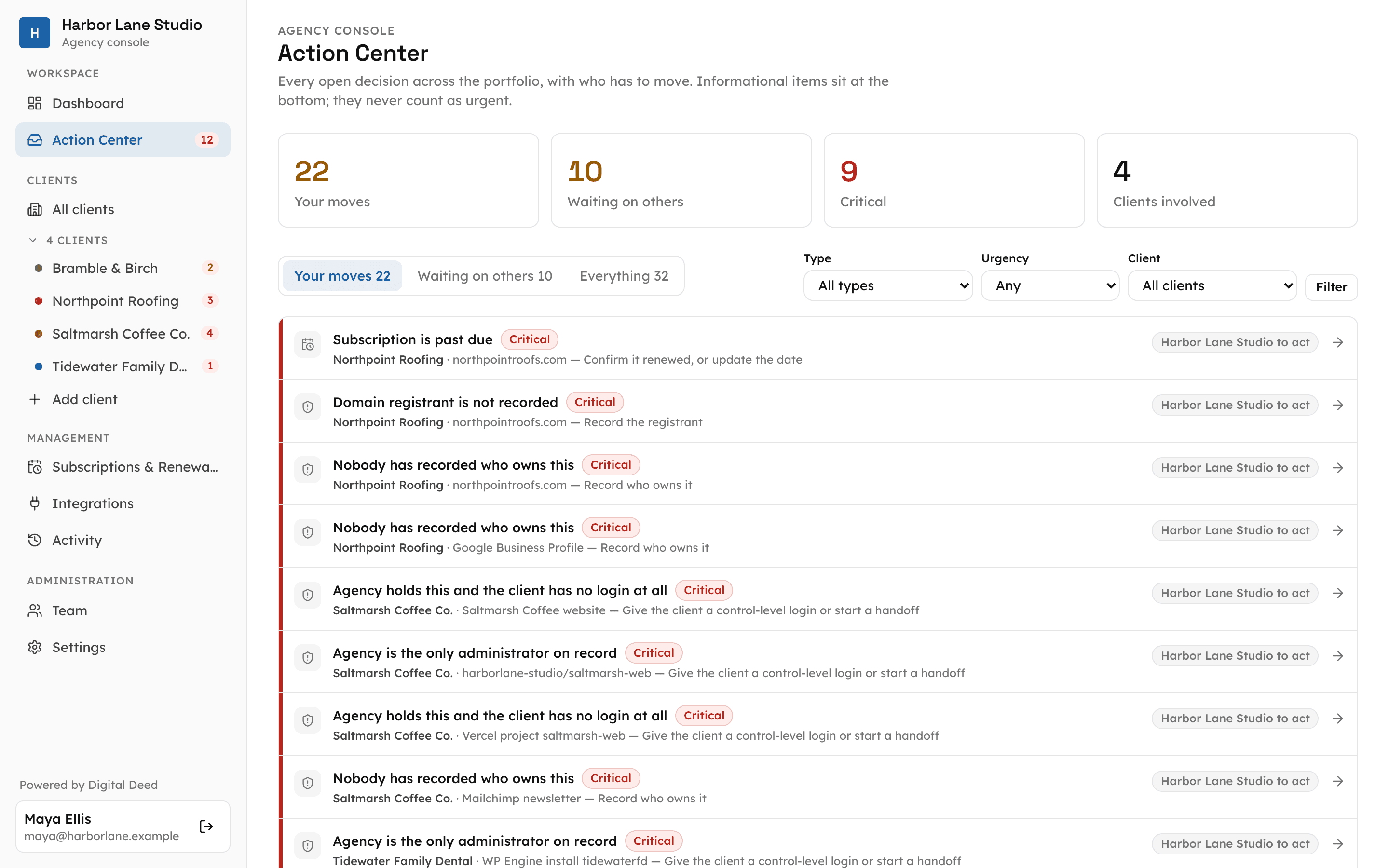
The professional's Action Center, listing their own moves first and what is waiting on clients

Project inheritance

Every project is inherited. Most arrive without a map.

Someone set up the domain. Someone else made the email and the Google listing. Then they moved on. You inherit all of it, and before the paid work starts comes the wild goose chase: hunting for logins, working out how to share access, a project stalled because the domain sits in an account nobody can reach.

You don’t just build websites. You build the business’s whole digital ecosystem. The map saves hours. That’s the point.

Inheritance day looks like this.

What the business already has

  • An old GoDaddy account holding the domain
  • A Facebook page someone made years ago
  • A Google Business Profile a staff member set up

What you bring

  • A GitHub codebase and Vercel hosting
  • The domain's DNS, pointed at the new site
  • Google Analytics, freshly started
  • Meta Business Suite permissions

Digital Deed keeps all of it in one place: who owns each piece, who manages it and who pays for it.

The client portal

Your brand on every client’s portal.

Offer it under your own brand. Your logo and color on every client’s portal, “managed with” your name, backed by digitaldeed.dev, so both sides stay in step and account chaos never starts.

  • Working today

    Your logo and color

    The client’s portal carries your logo, your accent color and “managed with” your name. Custom domains and typography are planned.

  • Working today

    Start it, or be invited

    Start a workspace for a new client and they claim it through their invitation, or the owner creates theirs and invites you in.

  • Working today

    Clients say yes or no

    Access requests and handoffs reach the client as plain questions. They approve or decline, and nothing moves until they do.

  • Working today

    Quick add

    Tick the accounts a client has and each goes on the record as still to find, with where to look. A new client is mapped in minutes, not an afternoon.

  • Working today

    A guided Checkup for owners

    Owners answer plain questions. “I don’t know” becomes a gap with a next step, so you stop doing the interrogation yourself.

  • Working today

    One console, every client

    See what needs you across every client, split from what you are waiting on. A Deed stays a draft until you issue it.

  • Working today

    More than one of you

    Several professionals can work on one business. Each one moves only what they offered, and only with the owner’s yes.

  • Working today

    Private notes stay private

    Keep working notes to yourself and share only what you choose. The client sees what you share, not your scratchpad.

  • Working today

    Activity history

    Every change, who made it and when, on both sides of the portal.

Underneath it: the map

A lasting record of everything the business runs on.

Domains, websites, hosting, code, email, the Google listing, social accounts and subscriptions, with what depends on what. Other portals start with projects and invoices. This one starts with what the client owns.

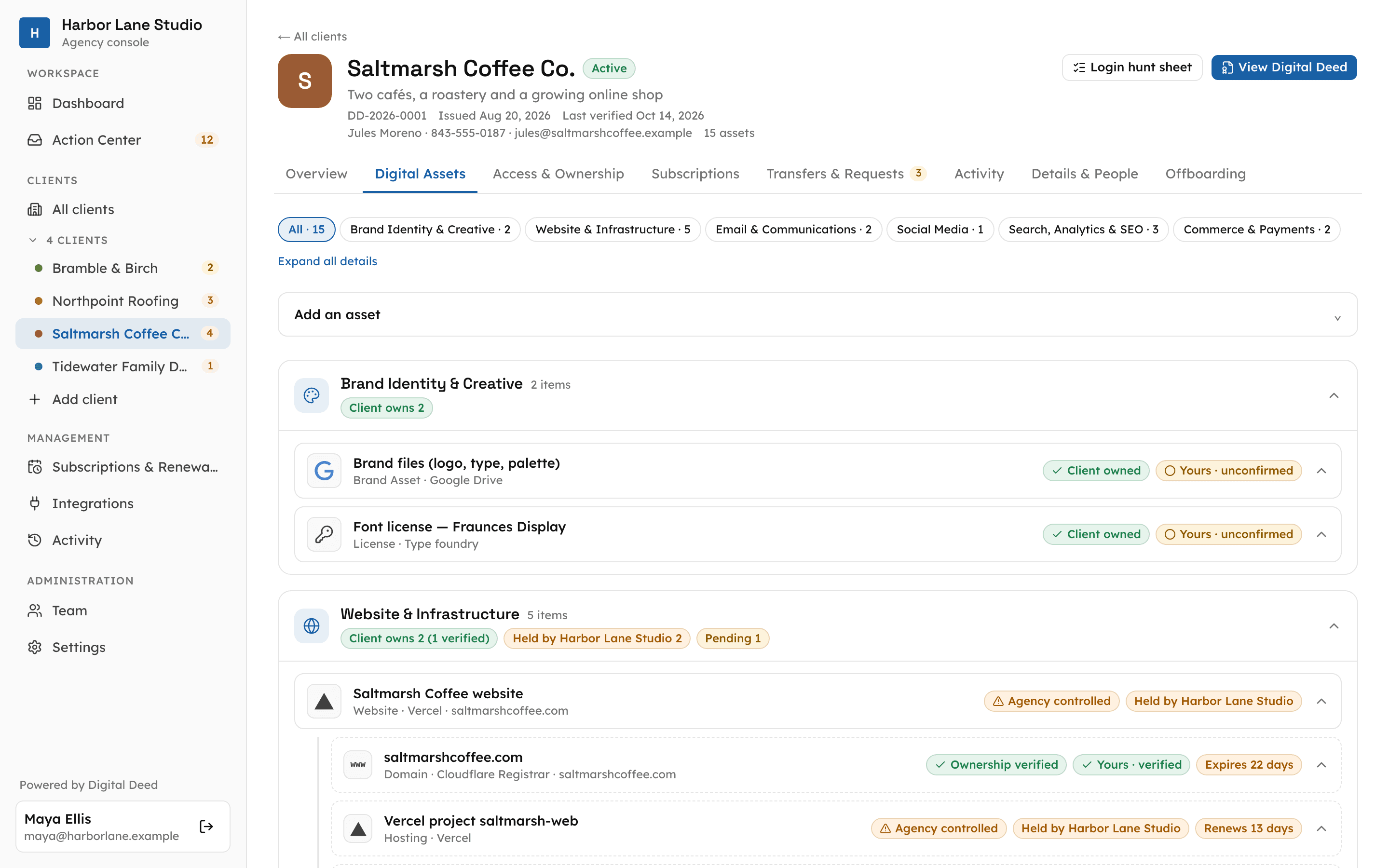
The asset register grouped into business categories, with a website carrying its domain, hosting and source code
  • Owns it, manages it, pays for it. Three different questions, kept apart, so you are never guessing whose account it is.
  • One honest status per account. Yours and confirmed, yours but not confirmed, held by you for now, or still to find. Uncertainty stays visible instead of hiding in a spreadsheet.
  • Never the passwords. It records where each login lives, not the secret itself.

Working today

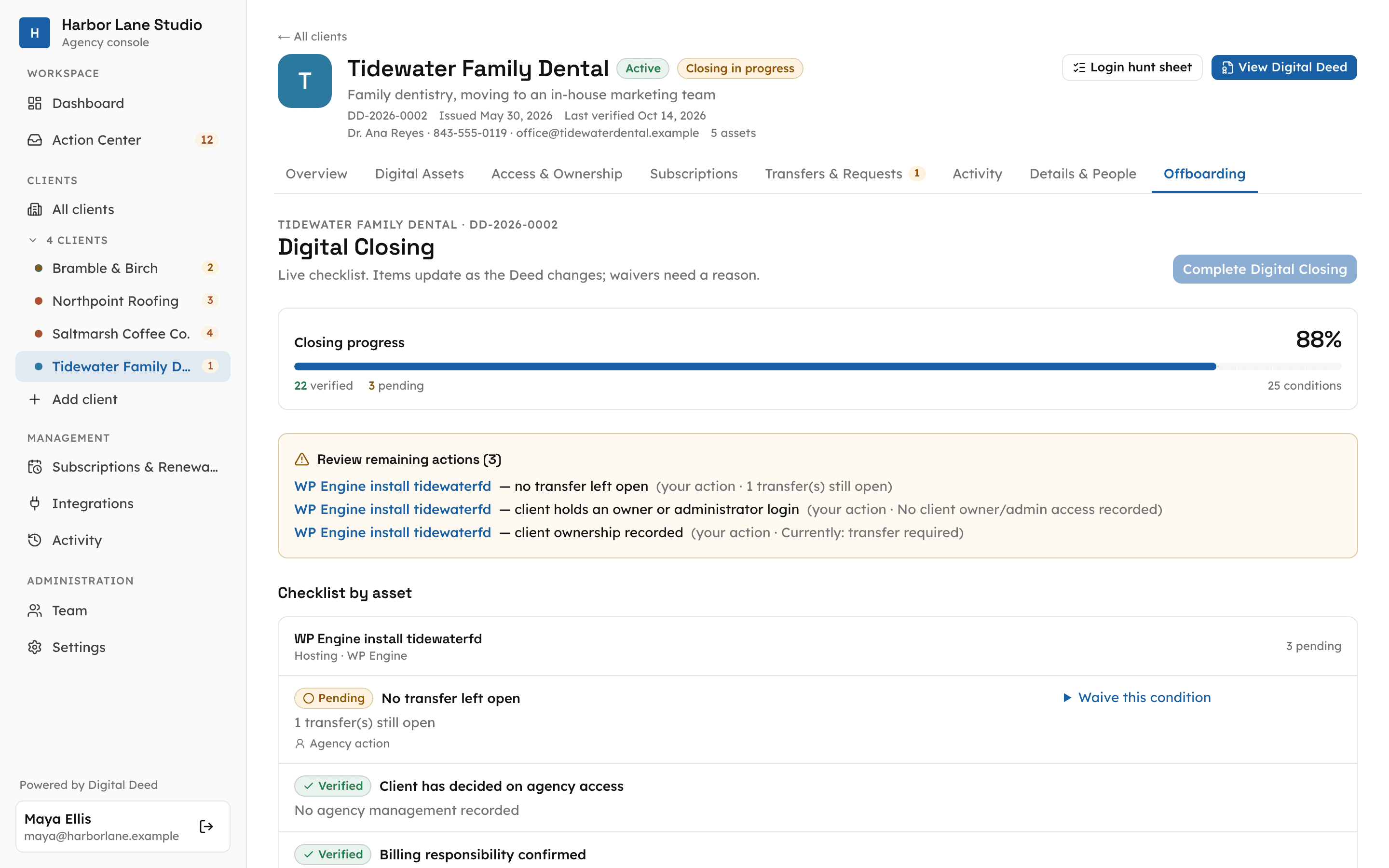
A Digital Closing checklist in progress, with the remaining actions listed

The handover

Finish like a pro. Even when you are staying on.

Hold things in your accounts while you build, hand them over when it’s time, or keep managing for as long as you’re useful. And if your head falls off tomorrow, your clients are not left with chaos.

  • Handoffs the client approves. Offer a transfer; the owner accepts it on their own record. Built-in for GitHub and Vercel, switching on with early access; elsewhere you document the steps and track them.
  • Digital Closing. A checklist shows the business holds every key before you step away, then freezes the finished record.
  • End well, keep the record. The business keeps its record; removing your logins at each provider is tracked honestly, never faked.
  • No lock-in. Export as PDF, CSV or JSON, readable by people, tools and AI assistants alike.

Working today

Trust you can show.

When a client can see every account, who holds it and who pays, they trust a freelancer with the keys. As AI tools get better, owners will want control of their own things, and they’ll be able to use it. Some clients will want you to handle everything, some will take over the small stuff, and plenty will change their minds. Digital Deed keeps you flexible through all of it: a team effort, moving into an era of digital ownership.

Your brand. Their business. A better way to work together.

Where the portal is headed

Keep clients because of the value you bring.

The record is where ongoing work should live. Here is what we plan to build on top of it. None of this is available yet.

  • On the roadmap

    Care packages and billing

    Define what a hosting, maintenance or content-update service includes, and bill for ongoing management through a connected payment service. Clients see what is covered and when they are charged.

  • On the roadmap

    Requests and approvals

    Client requests and conversations beside the work they concern, version approvals, and a clear record of each decision.

  • On the roadmap

    An AI CMS

    “Change our Saturday hours.” The client reviews a preview, then publishes within permissions or sends it to you for approval.

  • On the roadmap

    Files and brand library

    Approved logos, photography and guidelines in a place clients can actually find.

Where it’s at

An honest look at what exists today.

Digital Deed is in early access and opening in stages. Here is exactly where each piece stands.

Working today

Working today

  • The client's record: what they own, who manages it, who pays
  • One honest status for every account
  • Your logo and accent color on the client's portal
  • Start a client workspace; the owner claims it through their invitation
  • The owner invites you in; several professionals on one business
  • Quick add: map a new client's accounts in one pass
  • A guided Checkup for owners
  • Clients approve or decline access and handoffs
  • Handoffs with client approval, with documented steps you track
  • Digital Closing
  • End a relationship and keep the record, with access removal tracked honestly
  • Private vs shared notes, and an activity history
  • PDF, CSV and JSON exports, and a printable Deed
  • A console across all clients, with Deeds that stay drafts until you issue them
Switching on in early access

Switching on with the first early-access group

  • Direct GitHub and Vercel handoffs: the client accepts the transfer on their own record
  • Connect GitHub and Vercel in one click
  • Renewal reminders by email
  • Invitations and password resets by email (until then, you share the link yourself)
On the roadmap

Coming in stages

  • Care packages and billing for ongoing management
  • Client requests, conversations and approvals
  • An AI CMS with previews and approvals
  • Files and brand library
  • Custom domains and typography
  • Connections beyond GitHub and Vercel
  • Goals and reporting
  • An AI discovery assistant

Roadmap items are plans, not promises of a date. Where AI is involved, important changes stay subject to permissions and review, and answers should separate confirmed facts from assumptions.

Why I’m building Digital Deed

Why Bre is building Digital Deed

“In my first year as a freelancer, I worked with a dozen existing small businesses. Not a single business owner could tell me, off the top of their head, where their accounts were and who had access.

I was so surprised. Before we could move forward, we had to figure out what was already there.

As I helped untangle it, I kept thinking: if, for whatever reason, my head falls off, I want to make sure this business owner isn’t left with chaos.

That’s my way of saying their business shouldn’t depend on everything being in my head.

Owners deserve to understand what they own and choose how it’s managed. Freelancers deserve a practical way to deliver that clarity while running sustainable businesses.”

Bre, founder

A few practical questions.

Is this a client portal or an ownership record?

Both. The portal is how you and your client work together under your brand. The record underneath it is what makes it different: every account the business runs on, who owns it, who manages it and who pays.

Does the business really own the record, even if I set it up?

Yes. You can start a workspace, and the owner claims it through their invitation. The business keeps the record if the engagement ends.

Can I hold accounts while I build, or manage them long term?

Yes. Ownership is a stage, not a rule. Things can sit in your accounts while you build, move to the client at handover, or stay under your management with access the client approved. The record says which, honestly.

Does recording an ownership change transfer the account?

No. The record documents the arrangement and tracks status. Transfers still complete at each provider, and a record can be documented without being confirmed.

Will it connect every service?

No. Direct handoffs are built for GitHub and Vercel and switch on with early access. Other providers get documented steps you can track. More connections depend on what each provider allows.

Does it store passwords?

No. It holds where each login lives, not the secret. Exports never include passwords, keys or tokens.

What can I use today?

Digital Deed is in early access. The portal, the record, quick add, the Checkup, client-approved handoffs with documented steps, Digital Closing and exports work today. Direct GitHub and Vercel handoffs and email reminders switch on with the first early-access group. Care packages and billing, client requests, the AI CMS and the files library are on the roadmap, not available yet.

Own a business? Start here.

Find out what your business owns online and who can get in, with or without a professional.

For business owners

Leave the next person what you wish you’d been left.

Join early access to help shape the first release. We are opening to a small group of freelancers and small studios that build for small businesses first.

We use this address only for early access. No newsletter, and we never share it.